
In short, only the Student Summary import files need to be run first thing in a new year. This is the main import for a system rollover. For secondary schools the Timetable is also helpful once it is live.
—
Here are some notes on each import early in the new year.
Student Summary: At the beginning of a new year the most important imports are the ‘Student Summary’ files for each cohort. These will update the cohort and roll class for each student, archive students who have left and add new students.
If you have the setting option to ‘perform imports on server’ then you will also need to restart TrackEd after the first student summary import of the year to refresh the current year into memory.
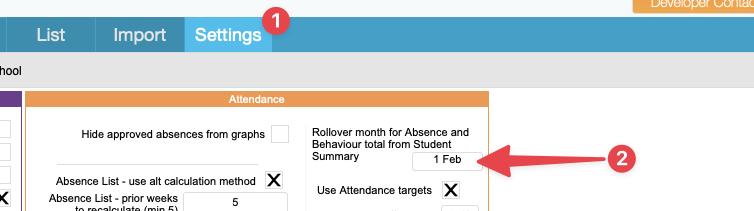
There is also a setting that may be helpful as it lets you control when the Absence and Behaviour totals are updated for the new year. Set at FEB 1 it will retain last year’s totals during a student summary import until that date, allowing you to save reports with relevant data for new teachers. Once the date is reached a new student summary import will update the totals for the new year.
—
Dynamic Student List: This should not be imported until new students are marked as active in the new year, as future enrolments may cause issues. Just skip it until then.
Absence List: This is not needed until week 2 when a full week of data is complete
Negative Behaviour: This is not needed until week 2 when a full week of data is complete
Positive Behaviour: This is not needed until week 2 when a full week of data is complete
Record of contact: This is not needed until week 2 when a full week of data is complete
Personalised Learning Summary: Can be updated any time
Student Class / Timetable: For secondary schools it is also helpful to add a new timetable import. The timetable needs to be live first, so wait until it goes live then , select a date range for the first full week of school.
Parent List: Can be updated any time, but is only needed before emailing parents
Student Photos: Only import these once new photos are available from the photographers
Primary / Secondary results: If not imported at the end of the previous year this can be updated in a new year too. Be sure to only export cohorts that are still at your school in the new year and skip any that have left.
